slices

Have you seen that new show, Sliced? It’s on the History Channel. This guy uses power tools to slice things open and see how they work. Tonight I flipped by, and he was dissecting one of those arcade games with the claw that comes down and grabs the toys. There’s one in a Denny’s about 20 miles from here. He showed how it’s rigged using a compressed air regulator to control the grip of the claw. You don’t have a chance, kid.

Wouldn’t it be more reasonable just to use screwdrivers and wrenches to dismantle stuff? Yeah, but it would be as much fun; it wouldn’t be made for television.

So here’s what I’m thinking about: what would I like to slice apart with a huge circular saw. Hmm. It would have to be something I’ve never taken apart to repair before. Well, I’m thinking one of these.

organ_wurlitzer

An essentially unoffending mechanism, in the right hands. In the wrong hands, extremely annoying. the same could be said for one of these.

STIHL S295E001  4CDS

But I’m told that chasing one of these down and chopping it up, while satisfying, interesting, and arguably justified, is illegal everywhere but Texas. There, they have a “he damn sure needed killin” defense to homicide.

So, what would you like to dismantle today? Here’s a little movie inspiration for you. (Language alert.)

Hey, I wonder if the guy who invented those arcade games is still around, and whether he likes baseball and rap.

disappearing firefox toolbars

This has happened to me a few times now. I’ll be messing around with Firefox toolbars, or with an extension, add-ons, or something. Next thing I know, one or all of my toolbars will disappear.

I keep my toolbars hidden when I’m not using them, except the main navigation toolbar. Minimalism is good. I’m not talking about hidden, I mean they’re gone – broken – nothing there but a dead strip of gray space where the toolbar is supposed to be.

If you’re fiddling with customizations, you probably know that you can turn them off and on, hide them, etc.  That’s the basic first step to check, found in most usergroups. It won’t work because we’re talking about fubar toolbar, not accidentally hidden. But just so you know:

Right click on an open area of a toolbar and you’ll see a list of toolbars you can click.

If you can see your menu bar (File, Edit, etc.), click View > Toolbars, and there’s the list.

If you can’t see your menu bar, press Alt.

But what if you can’t see your Navigation Bar, for example, and Firefox won’t turn it back on for you?

Go to View > Toolbars > Customize, and press the Restore Default Set button.

That should get things back to normal. It may also be necessary to restart Firefox. This will not save your toolbar customizations, but they’re gone by now anyway.

Firefox is great for letting us customize things, in ways that are far superior to Internets Exploder or Chrome. But letting us do it doesn’t mean Firefox always has to like it.

Bonus Tips

I mentioned you might not be able to see the menu bar. By default, the menu bar is always visible in Firefox; you can’t hide it. But there’s an add-on available that lets you do exactly that.

https://addons.mozilla.org/en-US/firefox/addon/4762

Cool!

As in most Windows programs, in Firefox F11 = full screen, Esc to return to normal.

oh the irony

“So the fishermen came to receive training in how to clean up the oil spill that was creeping up on the nearby coastline. They were hoping to be hired by BP, the company blamed for the spill and responsible for cleanup efforts.” – NT Times

A disaster of Biblical proportions is unfolding there. And we don’t need one here.

I’m going to Vote No on Measure J – on shore exploratory oil drilling in Carpinteria. And if I get a chance to vote on offshore exploratory drilling near my home, I’ll vote no again.

Citizens Committee Against Paredon Initiative

Hide Controls in G-Docs

Another in my occasional series, Holy Crap, This Is So Cool.

I like Google Docs, don’t you? It’s a great place for light word processing, spreadsheets, simple presentations, even for doing forms and drawings.

A Few Basics

If you have a document in almost any format, you can upload it to Docs and work on it there. There are 2 options, save it as a Google Doc and work on it online, or store it in it’s original format.

There is no limit for stuff in Google Docs format. Docs does have a limit for files you upload and keep in their original format (Word, XLS, Powerpoint, etc) but it’s 2gb. That’s a lot. It’s 2000mb, and my 235 page novel is less than 1mb in Word.

When you’re ready to save your document to your computer in a native application such as Word, Excel, Powerpoint, etc., Docs can do that quickly and very well.

The very cool thing I learned today.

You can hide the controls bar across the top of your document! In other words, Google Docs has a Full Screen mode. Who knew? 

This is great because I like to zoom in – make text larger – while I type. If you leave the controls at the top, they get bigger too, which sucks.

Note: Don’t know how to zoom? Scroll the wheel on your mouse while holding Ctrl. Or use View > Zoom on your toolbar.

To Hide the controls, Select View > Hide Controls on the Google Docs controls bar.

Or press Ctrl + Shift + F.

Press Esc to return to normal view.

Now you can zoom and out in to your heart’s content, and all that changes is the text and the page, just like any word processor on your hard drive.

If you press F11 on your keyboard also, you’re looking at nothing but your document. F11 takes your browser to Full Screen mode. Press F11 again to return to normal.

Very cool! See, you gotta stick with Metaphor to learn good stuff.

a kneadful thought

Everyone is kneaded out of the same dough but not baked in the same oven.

– Yiddish proverb

Boy, that’s the truth, isn’t it? Even in the small town where I’ve grown up, there’s a big disparity in values.

There are the whole grain flakes like me who care mostly about the quality of our environment and long-term flavor of life. And there are the unleavened ones, who don’t care what rises or falls, year to year, and would slice off half a loaf or more to make some short bread.

You thought I was gonna say dough, didn’t you?

Doh. 

death by powerpoint

Powerpoint is driving the Army nuts.

A funny article in the NY Times about the US military, and how everything they plan or do is being reduced to Powerpoint slides.  The reducto absurdum of war.

Like an insurgency, PowerPoint has crept into the daily lives of military commanders and reached the level of near obsession. The amount of time expended on PowerPoint, the Microsoft presentation program of computer-generated charts, graphs and bullet points, has made it a running joke in the Pentagon and in Iraq and Afghanistan.

The article includes some quotes which are fast becoming famous, including this wonderful thing:

“It’s dangerous because it can create the illusion of understanding and the illusion of control.
Some problems in the world are not bullet-izable.”

– Brig General McMaster

Yes, he was referring to Powerpoint when he said, "it's dangerous."

Also via this article, we can all have our very own copies of this amazing Powerpoint slide, a real Army document which illustrates just what they're up to over there. Go ahead and click that link. It's been rendered for posterity as a humble jpg file. I wish George Orwell was alive to see it. He might say, "Sonofabeach, I hadn't imagined this in my wildest dreams."

Poor Microsoft gets blamed for everything. It's another example of how the method has become synonymous with the process. Just like to google something replaced searching for it. Not everybody uses Google, but we all say, "I'll Google that."

Hey, maybe they should try Google Docs. It has a nice lightweight alternative to Powerpoint. And with a satellite internet uplink, they could work on their presentations from anywhere in the field of operations. … Or maybe they wouldn't like that much. This motto might be stenciled on a tank:

No Powerpoint, No Peace

Lying To The Dog

If you stare long enough at that space between the trees – there, where the row of dry junipers leads the eye down to the field of baby’s breath – you begin to see water. It’s a lake, perhaps a sea, lying peaceful and cool, and not a field at all. You can hope that no one comes to cut and plough it, leave it fallow for winter. 
And that’s what she sees from the window each morning, when she rises and stands alone in the quiet house.
The sun is just up, hitting the potting shed with its white window boxes, and shining on the hollow bones of the swing set rusting in the yard. There is a mourning dove on the crossarm of the power pole, cooing to himself. This has always been her favorite time of day. So calming to stand by the window, looking down at the wet grass. The dog sniffs bush to bush along the fence. She does not see him but watches the dove. Countless short and tiny lives are waking to the daylight all around.
In the kitchen, she takes the pan and the plate from the sink – where he left them before first light without rinsing the greasy leavings of egg and black pepper – and puts them in the dishwasher, setting it to rinse and hold. And hold is all she really wants to do; just to keep a grip on the life that’s casting her away with centrifugal force. And maybe she could use a rinse of sins as well; a drop of detergent for her guilt and grief. If only he could help her find such things, and stop insisting that by God he’s tried, that she’s had time to get past it, to drag her heart from the shadows; as much time as he’s had, anyway. 
The dog comes in and stops to drink from his bowl beside the pantry door, then comes up behind her where she stands at the sink. She hears him coming, nails clicking on the hardwood floor. He presses his nose to the back of her knee. Ignored, he goes to his bed in the corner and lies down. 
It’s true she’s had time, and he’s had time. Time has passed. But two years or two hours is all the same to her, who is always in that afternoon of their child on her bicycle, just a little big for her, with fat tires and a basket on the front – books going back to the library – riding away. Always away. So small with the trees behind her, and the gravel drive threading into the trees, to where it turns to meet the county road. That’s where she saw her daughter go, around the bend and into the trees. But she never came back out again. She was supposed to come back. That was the understanding. Come back from the library with a new book to read, to talk about. She’d suggested A Wrinkle In Time, which she had loved as a girl. Just a little time, then home; not this tearing away, this disappearing to another world. 
I don’t know what do to, she tells the dog. She won’t come home. I told her, straight there, straight home. Be careful, don’t dawdle. But you know she’s followed her nose into the candy store – she can’t resist. Now why are you looking at me that way?
The dog knows. He was here and rushed the door, barking, when the officers came. They came in slowly, eyes down, holding their big hats. She shoved the dog in the hall bathroom and shut the door, and told him stay as if he had a choice. He knew at once. He could smell it on them, the pitiful sadness of it, the rough road ahead waste and shame of it. He could smell the coming grief of it; bitter, musky like a possum running down the fence. So he sat on the lime green rug on the bathroom floor and whined, and fought the urge to howl. The dog knows his lady is lying. 
He should just leave us here, you know. We’d be alright, she tells the dog. My sister would come from Santa Fe and live with us. I could get a job. He doesn’t care about me and how my heart is broken. It would be good for you, too. She’s got two dogs and we have so much room, a yard that’s big enough for twenty dogs. 
 
The dog digs with his teeth at the hair between his toes, stands and paws at his bed, then turns around and lays back down again. He’s watching her. 
He doesn’t care. He only wants to leave. Just sell the house, drag up and go, he says. And how can I? You tell me that. How can a mother do such a thing? She’s much too small to be alone. The days are getting short again, and gray and cold. She’ll be hungry, tired from the ride. I have to be here when she comes.

Creative Commons License
Lying To The Dog by J. Kyle Kimberlin is licensed under a Creative Commons Attribution-Noncommercial-No Derivative Works 3.0 United States License.

sass and foss


The words of the day are sass and foss. This blog post is guaranteed or your money back to be the first occasion in the history of human languages in which the words of the day are sass and foss. And it is this crazy, slippery-footed tilting toward what’s unique and fresh – perhaps a bit absurd – that makes Metaphor so much fun.

SASS
Sass is from today’s Word a Day e-mail from Anu Garg, at wordsmith.org.

It is defined there as

noun: Impudent talk; back talk.
verb tr.: To talk disrespectfully, especially to someone older or in authority.

My favorite part of the word a day e-mails, frankly, is the daily quote. It’s usually more thought provoking for me than the day’s word. Today’s is from writer Fran Leibowitz, but it’s not one of my favorites by her. Here’s a better one:

All God’s children are not beautiful. Most of God’s children are, in fact, barely presentable.

And then there’s this one:

I never met anyone who didn’t have a very smart child. What happens to these children, you wonder, when they reach adulthood?

Funny!  You can find more Leibowitz quotes here. And that’s enough about sass.

FOSS
Foss stands for Free and Open Source Software. Free in this context refers to its license, not its cost. All software is licensed, meaning that its copyright gives people the right to use it, or not. FOSS is software that has a liberal license, which grants users the right to examine and study it, change and improve its design. The source code – the underlying program – is available to developers.

The term “free” in this context can be confusing. Wikipedia says, “In the context of free and open source software, “free” is intended to refer to the freedom to copy and re-use the software, rather than to the price of the software.” And that is true, except that a lot of free software really is free. Ah, English.

I’ve been giving this topic a lot of study lately, because the new version of Microsoft Office – 2010 – is thumping and trumpeting toward us like a great ceremonial elephant of incredible cost.

And part of me sort of wants it; it’s beautiful, the precious. I think we all understand what it’s like to covet things we don’t need, to be tempted by the marketing hype. To my credit, I rarely fall for it.
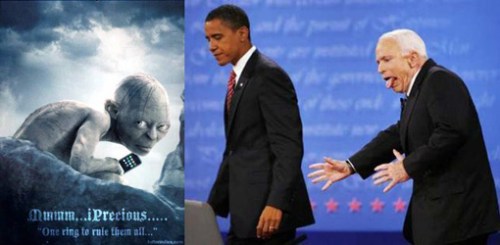
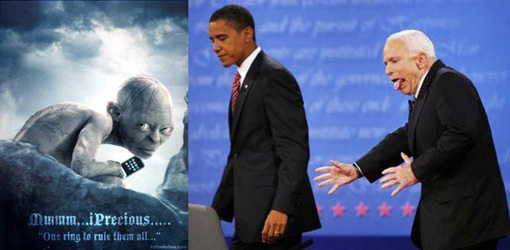
Part of me says Oh don’t be a yuppie acquisitive porcine fool. You have everything you need, and you don’t need that stuff, any more than you need a parachute on your pickup truck.

OK… I’ll wait while you look at the picture again. That’s Gollum from Lord of the Rings with an iPhone, and Obama, and McCain doing a hell of a Gollum impression. …  Good stuff … Ready?

Microsoft (MS) software is never free, although some of it doesn’t cost anything. Windows Media Player comes to mind. But I’m referring to Office software here; productivity programs, which we writers need.

MS Office is proprietary, closed source. It is manufactured and sold only by Microsoft, the owner of the patent and copyright and brand. It’s locked and top secret like Colonel Sander’s secret recipe. The company goes to great lengths to enforce copyright, spreading its presence over the planet like the Eye of Sauron. And they have that right.

They might say that strict copyright, and massive global campaigns against software piracy, help protect the consumer against faulty counterfeit software, while it protects MS revenues. OK, sure, and MS has the right to zealously protect its products. It has the right to charge an arm and a leg for a copy of Office.

I like MS Office, as I’ve said here before. I like my Word 2003, and other goodies. I’m not un-installing it just because I’ve got an itch for social justice and I found openoffice.org. My problem with MS proprietary software is the implication – the assumption – that we need it. Not that it’s better, or recommended, or excellent, but necessary. In truth it is good, but costly and not necessary.

To clarify, the problem of word processing software does not arise with what you use in your personal computer. It arises between computers and between people.

If someone sent you a Word file attached to an e-mail today, and you didn’t have MS Office with Word installed on your computer, what would you use to open and edit that file?


Unless you’re pretty computer savvy, you think you need to buy MS Office to use the files it creates. MS has told you this; they’ve whispered it in your ear. Psst! Word processors use doc (docx) files, doc equals Word. You need Word. 

MS wants a monopoly and tons of dough. They set high prices. Now we have a class of computer users who have MS Office and one that doesn’t. One can collaborate on Word documents, and one can’t. As far as they know.

By aggressively overpowering competition, MS has created the false premise that the only way to develop good documents is to use MS Office. This forces people to use software they don’t need, and undermines the opportunity to use lower-cost and free products. Even worse, MS tells us that MS Office is for sharing documents. This is a growing problem today, because document creation is going social – it’s moving off the desktop and into The Cloud. And up there, people really are going to need more than ever to be using exactly the same software.

This is not good. I think using computers to develop and share stuff is good for society, and everyone should be able to participate as freely and openly as possible. That’s social justice for the digital world.

But none of those MS – inspired pre-conceptions is true. MS Office is just a software suite that includes several components, including a word processor called Word. There are other Office suites, made by other people, that have several components, including a word processor. They will work with the same types of files, including Word files. And if we take the time to learn what we’re doing, we don’t have to be swept away by MS monopoly or pay for the painted elephant.

Computers themselves are expensive enough. They should come with software included, including MS Office if that’s what MS wants us to use. We do have a choice, most of us just don’t know we have it.

The only person I regularly share Word files with is my Mom. I installed her copy of Word on her computer, so I know that her version is the same as mine, so it should give the same results. Probably.

I try to avoid it with other people, because when we attach Word to an e-mail, there’s a chance that the recipient won’t be able to open it. If their version of Word is different, it will get messed up. The page layout, margins, headers, footers, fonts, etc., could all get screwy.

Here’s where it really gets creepy: Say you need to submit a document to an institution, such as a job application to a company, an application to a college, or a form to the government. You go to their Web site, and are told to upload a Microsoft Word file. I have seen this, I’ve done it. Click here to attach a Word file. Not everybody has MS Office. Not everyone runs anything from MS. What if you have a Mac and use Apple’s word processor?

It doesn’t say Upload a DOC format file using your preferred word processor. It says Word, the propriety brand name of Microsoft’s word processor. This means that governments and institutions are fostering the monopoly for MS, to the detriment of the general public. Can you say antitrust? Sure, I knew you could.

Imagine getting a summons to appear at the courthouse for jury duty. It says you must arrive driving a Ford, legally registered in your name. Borrowing a car is absolutely forbidden, making your Toyota look like a Ford is illegal, sharing a ride is verboten, and don’t bother taking the bus because only Fords will get you there. 

Solutions
First of all, stop believing Microsoft. Buy their excellent stuff if you want to, use it, enjoy it, but don’t believe you are required to. You don’t have to use MS Office. There are free Office Suites like openoffice.org, and low-cost ones like Oracle OpenOffice. (Those are the same thing, as far as I know, except that Oracle sponsors the first one free, and the latter has a few more features, like an e-mail program. The high end price is $90.)

Now you can have a full-featured office productivity suite that’s compatible with Microsoft Office—at just a fraction of the cost. It’s easy to use and has all the features and tools you could ever want. With its powerful functionality and low price, Oracle Open Office is an excellent value. – Oracle Web site.

Bonus Mind-blower: You don’t even have to run Windows on your PC. There are free operating systems, Linux and GNU. You can buy a computer with no operating system and put a free one on it, then go from there. Getting techy here.

See why I’ve been pushing OpenOffice.org on this blog? It opens MS Office (Word, Excel, Powerpoint) files, works with them, and saves them again in their original MS Office- compatible form, or in Open Document formats that are free for the public to use. People who don’t want to buy Microsoft Office don’t have to. They can use this free Office software and still be compatible with people using MS Office.

Don’t send Word attachments. I still don’t think it’s a good idea, no matter what software you’re using. Don’t ask others to send them to you. They don’t always come out right, they can contain viruses, and it’s just perpetuating Microsoft’s ostensible monopoly. Exception: you’re both using the same software, and you are both creating or editing the document.

The best way is always to Send a PDF. That’s a file that always looks exactly the way you wanted it to, no matter you used to make it, and no matter what software the other person has.

For instructions on how to get a free PDF creator and make PDF files, go to this page. Hey, that’s a free PDF about making free PDFs, written by me with a free word processor, made into PDF for free. Sweet.
Have a short document – just some text – that you want someone to have? Made it with your Word or something like that? Don’t send an attachment at all. Paste your text into an e-mail, and ask for review and a reply.

Coming in a future post: What about the cloud?