don’t forget the funny

I was just sitting here last night, flipping through Time magazine, and came upon 10 Questions for Garrison Keillor. He’s one of my favorite writers, you know.

10q_garrison_keillor_02a

What role do you feel public radio plays in America today?

Its role is to talk to people who are stuck in traffic. And conservatives become incensed enough listening to public radio that it keeps them awake so they don’t drive into a fire hydrant. That’s what we do: we save the lives of thousands of right-wingers every year. And they never thank us for it.

You once wrote that the humorist is the most endangered species we have. Is that still true?

No. The Internet is full of humorists. They’ve risen from the earth. They’ve fallen from the skies. Anyone can write anything, anytime they want. Blogs that are angry–which maybe half of them are–wear out. What people keep going back to are writers who are funny. That’s a great thing

Will you ever run out of Lake Wobegon stories?

No. As long as you can still hear and see, you’ll never run out of stories. I ran into an ancient cousin of mine a week ago, and she told me something I’d never heard before. My grandfather Keillor died before I was born, and she told me that every night, he lifted my grandmother into his arms–he’s a farmer, a big woodworking guy–and carried her upstairs into bed. He had a big mustache and beautiful singing voice. From that, you could come up with a whole year’s worth of stories almost.

that’s showbiz

Woody Allen said, “Show business is dog-eat-dog. It’s worse than dog-eat-dog, it’s dog-doesn’t-return-other-dog’s-phone-calls.”

I say Facebook is worse than dog-eat-dog, it’s dog-doesn’t-comment-on-other-dog’s-posts.

things I learned this week

Last week, I promised you a new series of posts called What I Learned Today. The ramp-up to gathering content for this hasn’t been quite what I’d hoped, mostly because I haven’t learned to write down the things that I have learned. But I do not return empty handed. Here are some things I learned – and wrote down – this week. I don’t think the date of each item matters.

  • In Yemen, 80% of the men and half of the women chew an indigenous herb called khat. (Pronounced cat.) I learned about this on ABC News, and you can watch the report here.

    You will hear the reporter and an American military officer say that everybody chews this legal narcotic, that it grows everywhere, and that 50% of the income in this extremely poor country goes to buy it.

    Question: if it grows everywhere, and it’s legal why do they have to buy it? Why don’t they just wander outside and pick some and chomp it up? For that matter, if somebody provided it to them free, that would free up 50% of the national economy. I mean, I can’t imagine that would result in more of them being stoned on Khat.

  • I learned how to set the default font in MS Word 2003. When you start a new document in Word 2003, the normal document template sets your default font as Times New Roman. I prefer Arial – the font in which this post is published – for my everyday writing. This little article on Microsoft Web site explains how to make that change.

  • I learned how to create and customize a new toolbar in OpenOffice Writer. If you need to know that, send me an e-mail. There’s a link in the right column.

  • I was down in the garage the other day, and a neighbor told me that much of the world’s natural cork comes from cork oak forests on the Iberian Peninsula. It’s true!

Well, that’s some things. I hope you found them informative. I’ll keep trying to learn stuff. But I don’t think I’m going to save them up anymore. If I learn anything, I’ll just post it.

Time for dinner.

draft 5 is in the box

Draft 5 Completed

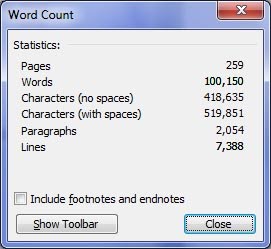
Today I finished Draft 5 of the epic novel that will not die. All 34 existing chapters are up to draft specs, tidied up and nicely formatted. And yes, that matters. There is art in them details. So … whew.

Here are the current statistics on the manuscript.

Of course, none of that means a bloody thing unless Draft 6 is better than Draft 5, and unless the whole process moves forward toward a finished book. So I have the outline and notes for the next draft all set to go.

Technical Decisions

In the process, I’ve made a couple of decisions. First, I’m staying with MS Word as my word-processing software. And it’s going to be Word 2003. The new Beta of Word 2010 is cool, sure, but I like the old application better. No accounting for taste.

I’m going to continue experimenting with Skydrive and Live Workspace for backup and work-in-process storage, but not relying on them. As I’ve mentioned in previous posts, the Internet isn’t ready for working in the cloud yet. It’s too hard to maintain consistent connectivity when I’m away from my hermitage.

Finally, I’m sticking with iTunes with harman/kardon speakers, and an iPod, to provide vital distraction from the miserable hoopleheads who can’t get in and out of their cars with honking their stupid horns. Assclowns.

Update: 7 is still cool

I’m still liking my upgrade to Windows 7. It’s not vastly different than Vista, just much less annoying, so far. And it runs like a Swiss car. Everything’s quicker than snot.

Sorry.

Just one thing is missing. I was really hoping it would come with ThinkCheck. I envision it as similar to spellcheck, except that it checks your thinking as you work. My thinking frequently needs checking, is my point.

Can’t believe Microsoft hasn’t got that running yet. But they’re probably hung up on trying to build code for moral relativism. Maybe they’re waiting to see what Google does with China.

And The Chink says Ha ha ho ho and hee hee.

Thoughts are the shadows of our feelings — always darker, emptier, and simpler.
 – Nietzsche

7 is up

Well it took hours – most of the day when all was said and done – but I finally got it done. I have upgraded my desktop computer to Windows 7. So far I like it better than Vista. It’s cleaner and leaner, and access to files seems more thoughtful and organized. Love the new desktop functions.
I didn’t need to an upgrade; the computer was running fine. But 7 was part of the package when I got the machine last summer. I just had to wait for the software upgrade to arrive. Then I put it off until after the holidays.
I spent the first couple of hours this morning backing up my 33GB of music and podcast files to my laptop, just in case everything when to hell in a bucket. I started the actual upgrade at 11:45am, and finished about 2:15. It was a smooth process, but not without stress.
There were several points at which parts of the operation showed a certain percentage complete, and the percentage didn’t change for several minutes. This made me worry that it had ground to a fatal stop. Certainly, that’s a metaphor of something.
After everything seemed to be done, I was testing my scanner’s function with Photoshop’s Import feature, when the computer simply shut off. The screen went black and the monitor said I’m going to sleep, Stupid. But that was nine hours ago, and it hasn’t happened again.
My old trusty Office programs, in particular Word 2003, seem to work great in Windows 7, as many online said it would. I’m pleased: I won’t need to spend money on a new Office suite in the foreseeable future. As it should be. I think when you buy a Microsoft Windows computer, it should come with Office, not that half-baked Works or the even worse Wordpad.
Which is why I’ve been so drawn lately to the free OpenOffice suite. And why I’m spending time getting to know it, even learning to customize it a little. I like that’s it free, it has everything I need except sometime to built web sites with – like MS Publisher, FrontPage, or Dreamweaver. And even though it’s free, you’re always getting the latest version.
So it goes.

Hide the Firefox Menubar

Oh Maynard, this is so cool. I was just surfing away here, hitting F11 occasionally to go full screen with Firefox. And thinking about how, for the years I’ve been using Firefox, I’ve been hoping they would add an option to remove the Menubar. You know, that list at the top that says, File Edit View, etc. I don’t use it very often, so why not keep it out of the way. Right.
Suddenly I said to myself, Self, with all the cool add-ons out there for Firefox, I’ll bet there’s one for hiding that thing. And Self said, Google it. And I did, and I had it installed in seconds and it works great. After you install it, the menubar is gone. Want to see it? Hit the Alt key.
So I’m setting you up:

What I learned today

In my last post, I mentioned that I need to learn to do something new every day. I sort of implied that it’s a new years resolution or something. It’s not. I actually believe that I do learn something new every day, even after almost a half century spinning around on our little blue pixel in space.

Sometimes I incorporate what I learn into my life. More rarely, I am still conscious of what it was by the end of the day. So my new years resolution is to try to keep track of the things I learn. One thing every day.

Have you ever checked out OddTodd? It’s a fun site. He does a thing called his Daily Fact I Learned From The TV. It’s cool. And in the spirit of ripping off that premise, I propose to offer you – my indefatigable Reader – a daily what I learned today. Except I probably won’t post it every day. Maybe I’ll keep a list and post them once a week.

Assuming I succeed at all. I’m taking odds.

The odds are good, but the goods are odd.

Here’s my first episode of What I Learned Today and it’s a double for your money. 

… And by the way, I didn’t say these were going to be funny. I’m just a writer. I’m not OddTodd or Ze Frank.

Quick Tip for Showing/Hiding Mark-up (reviewing elements) in MS Word 2003.

When I’m working on a document, I often insert comments using the reviewing functions in Word. Sometimes I use Track Changes, so that all my editing markups appear conditionally until I finish the editing job.

There is an option to have the comments and tracked changes appear as balloons in the right column, or not. It’s nice to be able to turn the comments balloons on and off, so they’re not always in your way, right?

It’s always been my habit to go to the Reviewing Toolbar, click Show then scroll down to Balloons. A slow method.


Yesterday I learned that if you go to View > Markup, you can easily hide all the balloons, and the changes. This shows you the document without comments, and with the changes that you have made but not yet finalized. In other words, the final document without markups.That’s faster.

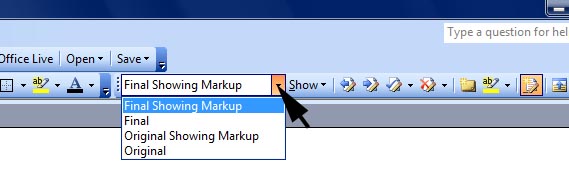
Today I learned that on the Reviewing Toolbar, there’s an option to select how you want to view the document. You can see the Final Showing Markups, the Final, the Original Showing Markups, or the Original. That’s a lot faster, and easier.

(Click to Enlarge)

Sweet!

Well, let’s see what I’ve learned in a week or so, right? Maybe I’ll learn how I’ve been using Word for 15 years without knowing those obvious functions were there.