Here's a little video about going home.
Author Archives: Kyle Kimberlin
little biters
My stories run up and bite me in the leg — I respond by writing them down — everything that goes on during the bite. When I finish, the idea lets go and runs off.
– Ray Bradbury
Video Night
Here are some videos for you.
First we have presidential candidate (strange, but true) Rick Perry, discussing time travel. Pretty funny.
One of my favorites, Roy Zimmerman, does Dylan doing Christmas, with his brand new timeless classic Christmas is Pain. More funny!
For reasons I won't attempt to defend, Ronnie Milsap sings It's Christmas Once Again in Santa Barbara. This'll get your chestnuts roastin'.
Best for last, here's a dog waiting for Santa to come. Cute little doggie!

Laughter Spreads
How I learned to relax and love free software.
Maybe I should say, how I’m learning to relax and love it. It’s progress, not perfection.


As I’ve shared before, I’m an Office 2003 guy, been using it since 2003. It’s good. But sometimes I look at the new stuff – Office 2010 – and I want it. So precious, my precious, etc.

I can’t have it. I can’t put it on my PC. I ran the Office 2010 Free Gratis Beta 2 years ago, and uninstalled it. It wasn’t ready yet. But it left some change in my machine that not even Microsoft’s best registry cleaning programs can fix. Now the latest 60 Day Free Trial of Office 2010 will not install.
Yes, I’ve tried everything except calling Microsoft on the phone, which I’ll be damned if I’m going to do.
By posting so often and so vehemently on this blog on the subject of Microsoft’s onerous and predatory proprietary ways, I drew a line in the sand. Then I stood on this side of my line, with all the free and perfectly acceptable open source software for which I have advocated. And I jumped back and forth until Microsoft gave me a good shove. I mean they crossed they line.
Up with this I shall not put, is my point. So in the noble last words of General George Armstrong Custer, “F–k ’em if they can’t take a joke.”
…OK, that’s a little racist, but it’s funny.
This post was composed in WriteMonkey in plain text and posted to Google’s Blogger using Gmail via Posterous. All free stuff.
Now I’m going to go write something nice, using LibreOffice. I’m relaxed, really.
Hey Bill Gates, you Assclown, you can keep the kool-aid. Grumble grumble. And go pound it up your … sideways. Grumble grumble. So there.
full screen videos
I've been posting a lot of videos lately, while I ponder new posts about writing.
For me, it's generally more enjoyable to watch videos online in full screen, rather than the small format presented here on the blog and on YouTube.
To watch in full screen, look for the button in the bottom right corner of the video, which looks like four arrows pointing outward, expanding a square. It looks like this.


To return to normal screen mode, press the Esc button in the uppder left corner of your PC keyboard.
By the way, the little button that says YouTube takes you to the YouTube site to watch the video there. Sometimes that's better, especially if the video is loading and playing slowly through the blog. I hope you're enjoying the little movies.Deck the Halls!
only human beings
I love this little video. It’s only a minute and a half long, with no puppies or cute kids. But it gives me hope.
Watch the Los Angeles City Council call for a constitutional amendment to reserve constitutional rights to living human beings.
Writemonkey Rocks
I have a new favorite writing tool, called Writemonkey. It is very cool.
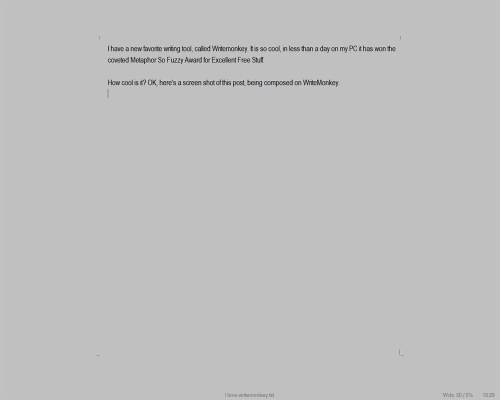
How cool is it? OK, here’s a screen shot of this post, being composed on WriteMonkey.

Click to Enlarge
I reduced the size of the image for blogsake. My monitor is on the larger size for common PC screens. But what you see, the open gray field, text in the center, name of the document at the bottom, is all I see in my monitor. This is the latest, and in my mind, the best so far, of the trend toward using distraction free text editors. That used to mean Notepad, but Notepad has nothing like these features.
There are no buttons or toolbars or anything. Just the space and the words.
On the Writemonkey web site, we find:
“Writemonkey is a Windows zenware* writing application with an extremely stripped down user interface, leaving you alone with your thoughts and your words. It is light, fast and free. With an array of innovative tools under the hood, it helps you write better. Editing is for another day …”
Writemonkey is not a word processor. Word is a word processor. This is a text editor, just for creating plain text. You can make the page and the words any colors you want, and you can change the font. But you won’t have different fonts or colors in a document. Just words. No pictures or embedded spreadsheets.
Writemonkey has tools for writers such as keeping track of your writing by a percentage of a goal you’ve set. It has a spellchecker. It even has tools to help you do research on your writing. But you can’t seen any of that stuff until you want to. And when you do, it appears simply and quickly with a mouse right-click or a keyboard command. No big toolbars ever appear to distract you from your words.
Writemonkey is free, but you can donate to help make it possible. I think it’s great. Go get you some.
- Writemonkey web site, info and download: http://writemonkey.com/
- PCWorld review and download: http://goo.gl/VRu0A

 Metaphor